Showing posts with label Miscellaneous. Show all posts

Friday, November 2, 2012

Visual Studio 2010, 2012 vs. Inconsolata font, part 3

Earlier, I promised to update the status of the fight "Visual Studio 2010 vs. Inconsolata" as soon as I have a chance to try the font in Visual Studio 2012. However, I noticed that the font has been updated also and the latest version of Inconsolata is available from September, 2012.

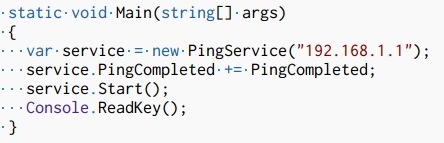
So first, I tried it in Visual Studio 2010, silently hoping that the troubles are gone. And yes, the extra boldness of some symbols is no more the case. Here is how it looks:

Inconsolata in Visual Studio 2010

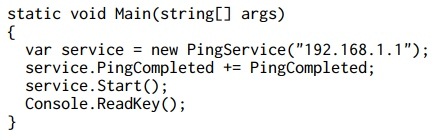
After that I switched to Visual Studio 2012. No surprises, the font is rendered perfectly:

Inconsolata in Visual Studio 2012

So I guess, the confrontation is over. If you love Inconsolata font, just get its latest version from google code repository and enjoy!

Tuesday, April 3, 2012

Find a difference

Hi there.

Can't help posting two logos:

Blackberry Developer zone


JetBrains Resharper 7 announce


How this can be?

Friday, July 15, 2011

Quality of Microsoft Windows UI

Recently I was investigating Microsoft Windows Control Panel applets and found an unexpected issue. Although most of contemporary applets look like they have identical look’n’feel properties, it is not true. Moreover, I suspect that there was no any common UI guidance for them. Look here, I took 3 random Control Panel Applets, placed them into a stack and compared left margin of main title. It is different in all applets!

Follow the red line:

Windows Control Panel

Let’s check vertical margins. Oh, no. The same picture.

Windows Control Panel 2

How this can be? The author of UI guidance for applications for Windows doesn’t follow their own rules.

Tuesday, June 21, 2011

Free Online OCR (Optical Character Recognition) tool

In case you need to quickly recognize a text from an image file and don’t have ABBYY FineReader installed, there is an online analogue. Moreover, it is completely free. It is called Free OCR and is located here: http://www.free-ocr.com/

One thing made me laugh: they have to use Captcha technology to protect the website from spammers who used it for captcha breaking! This argument is enough to prove the service efficiency. =)

Hope this service will be helpful to someone as it was to me.

Wednesday, June 15, 2011

Windows 7 VPN connectivity trouble

Sometimes Windows 7 rejects my attempts to open a VPN connection, saying that my computer is not connected to the Internet while it is. I don’t know the reason why this happens, may be someone can explain such a weird behavior when one part of the system doesn’t know what happen in another one. Here is how it looks:

InternetTrouble

I marked the regions that are important on the screenshot. So, while I’m writing and publishing this post VPN networks are still unavailable. Damn Windows. If anyone knows how to sort this out without logging out, plz, let me know.

Thursday, January 20, 2011

Gosh! Someone is damn good at support

support.x-tensive.com

Just a funny case, notice the amount of karma =)

Wednesday, December 29, 2010

Visual Studio 2010 vs. Inconsolata font, part 2

Recently, someone notified me that TTF version of popular Inconsolata font had released and is accessible here. There were some troubles with the OpenType version of the font, so you had to convert it manually to TTF format in order to use in Visual Studio 2010.

So, I’ve downloaded and installed it immediately. The font appeared in Visual Studio 2010 font list. Good. I’ve set it as a default font for text editor and what I’ve seen? Something unexpected:

Inconsolata in Visual Studio 2010

All kind of braces are being rendered in bold, the same goes for semi-colon and comma symbols. But wait, may be the problem is not in VS2010 and the font has troubles? Let’s check the hypothesis and do the same in VS2008:

Inconsolata in Visual Studio 2008 

Looks amazing!

Checking the hypothesis in Notepad:

 Inconsolata in Notepad

Again, no problems. The font is really awesome.

So what are the problems with that Visual Studio 2010 text editor? What were the reasons to change the bug-free and greatly working component from Visual Studio 2008 to this unreliable child of modern technologies? I don’t know.

P.S.
If you find a workaround, please, notify me. Thanks.

Thursday, December 16, 2010

Express Software Releasing Challenge

I’ve been thinking that Chrome browser team is the champion in super fast release building. According to Wikipedia, they managed to deliver 5 major revisions, from 4.0.249 to 8.0.552 within 2010 year, and I’m not sure that they won’t release the 9.0 before the New Year.

I’ve been thinking so until I opened my RSS reader today and found out that there is another pretender to this title, and its name is: Opera browser team, my congratulations! They managed to deliver 3 Release Candidates within a day. Here is the proof:

Opera RC

Frankly speaking, I’ve never seen anything like this in my whole life. What a speed!

Monday, November 8, 2010

On ASP.NET

As you might suppose, I don’t like ASP.NET also. It adds unnecessary complexity and generates tons of garbage inside webpages (not to mention ViewState), pretending to solve such a simple task as building html application.

Take a look at this piece of shit code, which represents an ordinary checkbox:

<input id="ctl00_ctl00_ctl00_ContentPlaceHolder_ContentPlaceHolder_ContentPlaceHolder_formProfile_checkBoxSubscription" type="checkbox" name="ctl00$ctl00$ctl00$ContentPlaceHolder$ContentPlaceHolder$ContentPlaceHolder$formProfile$checkBoxSubscription" checked="checked" />

I’ve found it in a common ASP.NET page, imagine how much pieces of such creepy code in the Internet.

Wednesday, October 27, 2010

On WPF

Recently, I’ve get interested in practical usage of WPF technology and, as an obvious result, I’ve encountered plenty of obstacles as the technology is not as clear and straightforward as Windows Forms was.

I agree that from the theoretical point of view, WPF might be considered as a great step forward, but from practical one it is likely to be 2 steps backward. It is overcomplicated, it requires you to forget the well-known time-proven UI concepts and techniques, and to spend weeks and months on studying the brand new one. And even after that you can’t be sure that you are doing things right just because almost all things could be done in plenty of ways: code, styles, templates, etc. Not to mention the absence of several must-have controls in standard library, such as DataGrid, DateTimePicker, MaskEditBox, etc. on the moment of .NET 3.5 initial release. What are they hoping for? I don’t understand. Frankly speaking, it seems that WPF is bringing much more problems than it tries to solve. Remember blurry fonts and images, long application startup time, etc.

Moreover, I’m not alone in these thoughts. The Internet is full of stories on the subject. For example, when I was trying to find a solution for one of problems which could be easily solved in Windows Forms, I’ve bumped into an interesting and rather emotional post, which is titled as “What the HELL is wrong with WPF?”. Don’t miss it as well as its comments.

Some quotes:

- “Using WPF I can easily make a button which contains a spinning 3D cube playing videos on each face that turns green when the mouse goes over it, all without any C# code. Unfortunately, no one would ever want to do that, while it’s easy to imagine a situation wherein you’d want toolbar icons to gray themselves (like, I dunno, every Windows application ever made).”

- “I fucking hear ya! I’m also struggling with this shit every day just to discover that MS – again – really went out of their way to accommodate every possibility imaginable but rendering the whole system/concept unusable on the way.”

- “…I mean SERIOUSLY? What the fuck man! Win forms were a beauty, then why the flying fuck you want to release something ENTIRELY different and say that its the way forward especially when winform isnt broken. I mean why fix something when its not broken.
I am so sick of MICROSOFT and their policy of shoving their crappy pieces of junk software down our throats. They know people are smart and don’t want their shit, so they start issuing threats of disengaging old software unless you buy the new one.”

Wednesday, October 20, 2010

Scroll Lock key as OS crasher

Recently, while surfing the wikipedia website, I’ve bumped into an article about the ScrollLock keyboard key. In list of its utilizations in numerous programs, the following one made me smiling:

In Windows NT-based operating systems with a certain registry setting called "CrashOnCtrlScroll" enabled, double tapping Scroll Lock while holding the Ctrl key initiates a system crash to allow debugging the current state of the operating system.

Be careful, guys! =)

Wednesday, September 8, 2010

For those, who prefer the dark side

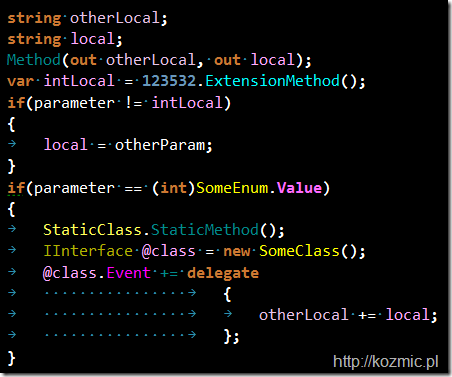
Just have found a nice color scheme for Visual Studio with ReSharper 5.1 {ColorIdentifiers = On} by Krzysztof Kozmic.

Here is how it looks:

R51

Hope you will like it.

Thursday, September 2, 2010

Are you a human being?

SO-fixed

Unfortunately, I’ve failed to pass the verification test. May be you will manage to do this?

Sunday, August 29, 2010

The most useless feature of Visual Studio 2010

Although the majority of people like discussing new exciting features and possibilities, I tend to be more rational and sceptical in this field. For example, I don’t like the new blue-yellow look of the studio,  I hate the new WPF-base editor because is doesn’t support my favorite open type fonts, I dislike the situation when every new release of VS is becoming slower and slower and eats more and more resources but the most annoying thing in my opinion is the tendency to add bells and whistles instead of concentrating on quality and performance.

Take, for example, the following “killer-feature”, which everybody might have already noticed:

VS-zoom

It is editor zoom control. Everyone was dreaming of this for ages. (Yes, it is sarcasm). They even dedicated to it a standalone post with video trailer. Nice. Here it is.

I especially liked one of the comments by Atle Iversen, let me quote it:

“Here are my suggestions for "features" in Visual Studio 2012 (which would make me actually consider upgrading)

  • increased performance (everywhere)
  • less bugs (everywhere)
  • less memory use/waste

I know that you put in a *lot* of effort in improving Visual Studio, but you're putting in the right effort at the *wrong* places - instead of more functionality with less quality we need less functionality with more quality !!!”

Although, I’m not sure that anybody from VS team has heard this cry from their customer.

Moral: Stop living in reality separated from your customers, their needs and requests. It’s a dead end.

Sunday, August 22, 2010

Visual Studio 2010 vs. Inconsolata font

Hello,

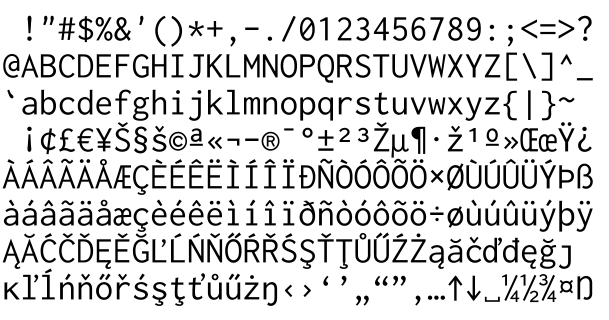
After several days playing with the Silk style for Visual Studio 2008/2010 I’ve realized that you can’t achieve more or less good overall results with default fonts like Consolas, Courier New or something. I know that there is a perfect font, named Inconsolata, and what is more important, its author made it free. Here is how it looks like:

The same font in action:

I must make a remark that the font is being redistributed in OpenType format. I was happy using the font in Visual Studio 2008 but unfortunately, 2010 version has different Text Editor component, written totally on WPF and these things together make impossible usage of all other fonts except TrueType ones. WTF???

Luckily, I’ve found a workaround:

  1. Download the font from the official site.
  2. Go to online font converter, and convert OpenType Inconsolata font into TrueType format.
  3. Install TrueType version onto your system.
  4. VoilĂ !

VS

Hope that will be useful.

UPDATE:

Here is the second chapter of this fascinating story.

Friday, August 20, 2010

On Visual Studio styles

I’m almost sure that everybody knows StudioStyles.info website, where tons of various syntax highlighting styles for Visual Studio 2008/2010 are being added and updated everyday.

Right after its appearance I decided that default VS style is too bright and therefore, too tiring for my eyes and switched to a darker one, named “Son of Obsidian”:

sonofobsidian

I thought that I would feel positive result but I was wrong. Watching on dark screen and seeking for light symbols of code seemed to be even more tiring than the default color scheme. Soon I started to search for less contrast schemes and after several minutes of looking over styles on the website I found “Old Book”:

oldbook

This one was much better, it was really easy for eyes, and mimicked an old, pergameneous book. I used this style for several months, until I realized that it was not ideal and there might be more optimal one.

Today I’ve made a draft of a new style, which is going to be clean and tidy. Here it is:

silk

I’ve named it as “Silk” because in my opinion it is smooth and clean. If you like it, it can be found here.

I would like to hear any comments or remarks.

Friday, August 13, 2010

Fast Reflection Library

Hi there,

Recently while browsing Microsoft Codeplex projects I’ve found another good thing. They call it ‘Fast Reflection Library’, it is written in C# and its purpose is to provide the same as part of the reflection features like executing method dynamically but give simple and faster implementations.

Example of usage:

using System;
using System.Reflection;
using FastReflectionLib;
    
namespace SimpleConsole
{
    class Program
    {
        static void Main(string[] args)
        {
            PropertyInfo propertyInfo = typeof(string).GetProperty("Length");
            MethodInfo methodInfo = typeof(string).GetMethod("Contains");
    
            string s = "Hello World!";
    
            // get value by normal reflection
            int length1 = (int)propertyInfo.GetValue(s, null);
            // get value by the extension method from FastReflectionLib,
            // which is much faster
            int length2 = (int)propertyInfo.FastGetValue(s);
    
            // invoke by normal reflection
            bool result1 = (bool)methodInfo.Invoke(s, new object[] { "Hello" });
            // invoke by the extension method from FastReflectionLib,
            // which is much faster
            bool result2 = (bool)methodInfo.FastInvoke(s, new object[] { "Hello" });
        }
    }
}

Although DataObjects.Net contains its own implementation of fast reflection (see: Xtensive.Core.Reflection), I like in this one the following aspects: clear & minimalistic design, simple and obvious API & ease of use. It took several seconds to understand the general idea and start using it. I think that this might be a good example of how library should look like: it should solve 1 concrete problem in most efficient way and do nothing more in order not to turn into another dinosaur.

Friday, July 9, 2010

The useful finding

Just’ve found on the web an amazing resource full of nice CSS templates, licensed under the Creative Commons Attribution 3.0 Unported License — FreeCSSTemplates.org.

Here are some examples:

Well done!

Sunday, March 14, 2010

Me on Google Buzz

Hello All,

here is my Google Buzz link: http://www.google.com/profiles/Dmitri.Maximov#buzz

I find it a bit more convenient than blog for sharing short ideas, publishing links to good articles and everything quick and small-sized.

Stay tuned! =)

Saturday, February 27, 2010

Denis Krjuchkov vs. Oracle

I’m glad to introduce yet another™ technology-related blog by Denis Krjuchkov, one of the most ambitious and highly talented software architects I’ve ever known. I’m pretty sure that the blog will be extremely interesting especially for those who is keen on investigating the very depth of modern software technologies, concepts and languages.

The first post is dedicated to a struggle with a weird bug in Oracle which prevents robust serializable access to database even when there is only one opened connection. So check this out.

BTW, the long-awaited DataObjects.Net 4.2 is planned to be released at the end of this week. Stay tuned!